
ChariPay add-on include translation files for French language. If your website/user is in French, you will see the admin and the front-end already translated to French.
1. Activate ChariPay for HBook as payment gateway
-
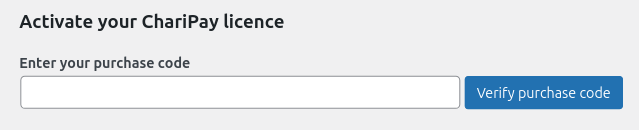
Once you have activated ChariPay for HBook plugin, you need to validate the licence in HBook > Licence.
-
Set ChariPay as active payment gateways in HBook > Payment > Active payment gateways.
2. In HBook, add ChariPay credentials
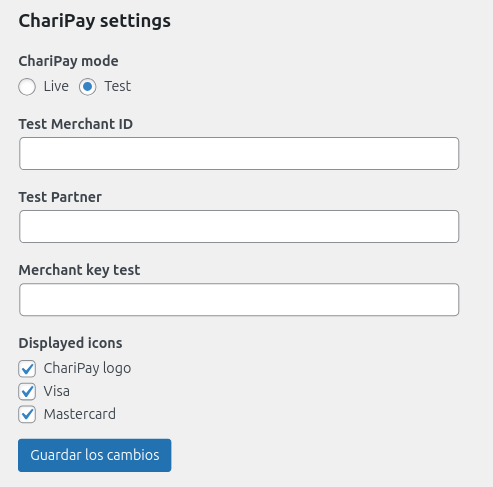
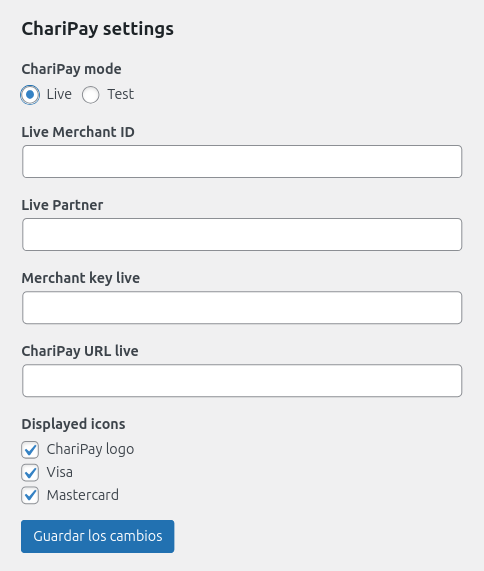
Set if you are in "Test" or "Live" mode in HBook > Payment > ChariPay settings.
Test environment settings
Live environment settings
Where to find the Merchant ID, Partner ID and Secret Key?
-
The Merchant ID are provided by CIM, for both test and live environment.
-
The Partner and the Merchant Key are provided by ChariPay, for both environment.
-
The ChariPay URL setting is only needed for Live environment. For the Test environment, it is a same URL for all ChariPay merchants, hence there is no setting for this in Test mode.
Merchant ID, Partner and Merchant Key will be different for the Test and the Live environment.
Which Test cards to use?
You can use the following test card in, Sandbox environment only:
Card number: 4918914107195005
Expiry date: 12/25
CCV: 123
Code for 3DS verification: 555
What has to be done to move to Live environment?
You will need to contact ChariPay as they will review the test transactions and provide you with Live credentials.