
You will use the availability calendar shortcode or bloc to display a calendar of availability. You can decide for which accommodation type the calendar is, as well as the layout (with the shortcode only).
Shortcode [hb_availability]
Use the [hb_availability] shortcode to display an availability calendar.
Default behavior:
-
Within an accommodation type page, be it an HBook Accommodation Type or on the page set as Display option, the availability calendar displayed is by default the one for this accommodation type. You do not need to add the parameter “accom_id”.
Parameters:
-
accom_id: this parameter can be used to specify which accommodation type is concerned.
Possible values are:-
all : add this parameter and set it to “all” if you wish to display a global availability calendar (are you fully booked or not?)
-
the ID of the accommodation type for which you wish to display an availability calendar
-
You will find the accommodation ID in the accommodation type post right under the title.
For example: [hb_availability accom_id="5"] or [hb_availability accom_id="all"]
-
calendar_sizes: add this parameter if you want to specify the sizes of the calendar.
Default is “2x1, 1x1”. It means that the calendar will have 2 columns if there is enough space to display them, otherwise it will have one column.For example: [hb_availability calendar_sizes="3x2,2x2,1x1"] (3 columns and 2 rows, or 2 columns and 2 rows, or 1 column and 1 row, depending on the available space)
Availability calendar block - Gutenberg
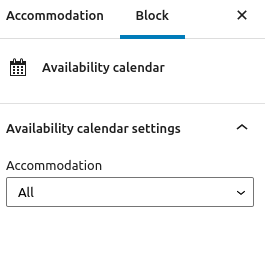
Select for which accommodation type the availability calendar is
Note that when displaying an availability for “All accommodation”, this will show the global availability. It will show a date as “Unavailable” when you are booked up and no accommodation are left for this date.