
Images you upload for your properties in HBook > HBook Connect must follow specific requirements from Google Vacation Rentals and Google Hotels.
General recommendations
The following requirements apply to both Google Vacation Rentals and Google Hotels:
-
Image URLs must be publicly accessible and crawlable by Googlebot or Googlebot-Image.
-
Do not block image URLs in your robots.txt file or through an X-Robots-Tag HTTP header.
You can check this article from Google to test your robots.txt.
-
Do not use watermarks, logos, or branding on your images, as these are not permitted.
Specific requirements for Google Vacation Rentals
To ensure your property is eligible for Google Vacation Rentals and performs well in search results, we recommend following the guidelines below.
A property must have at least 8 images to appear on Google Vacation Rentals, including at least the following:
-
1 bedroom
-
1 bathroom
-
1 common area
For the best results, we strongly recommend uploading 20 or more high-quality images, or as many as you have available.
Images should meet the following specifications:
-
Recommended resolution: 1920 × 1080 px
-
Maximum dimensions: 4000 × 4000 px
-
Maximum file size: 10 MB
-
Supported formats: JPG, JPEG, PNG, WEBP
-
Orientation: Landscape
Google automatically selects and orders the images displayed on your listing. This order cannot be customized and may change depending on a user's search. For example, if a guest searches for a property with a pool, Google may prioritize showing pool images first.
We strongly recommend that all images uploaded in the Property images section also be visible on the page selected as the Property page.
Specific requirements for Google Hotels
To ensure your property is eligible for Google Hotels and performs well in search results, images should meet the following specifications:
-
Recommended aspect ratio: 4:3
-
Screenshots of images or websites are not permitted
-
Images must be original and actual images or photographs
Image URL accessible by Googlebot Image crawler
If your site includes a robots.txt at the root level, verify that it contains one of the two options shown:
-
Allows the Googlebot crawler to crawl your site's content, images included.
-
User-agent: Googlebot
-
Allow: /
-
-
Allows the Googlebot Image crawler to crawl the images on your site.
-
User-agent: Googlebot-Image
-
Allow: /
-
You can check this article from Google to learn how to check if an image URL is available to Google.
Steps before uploading images
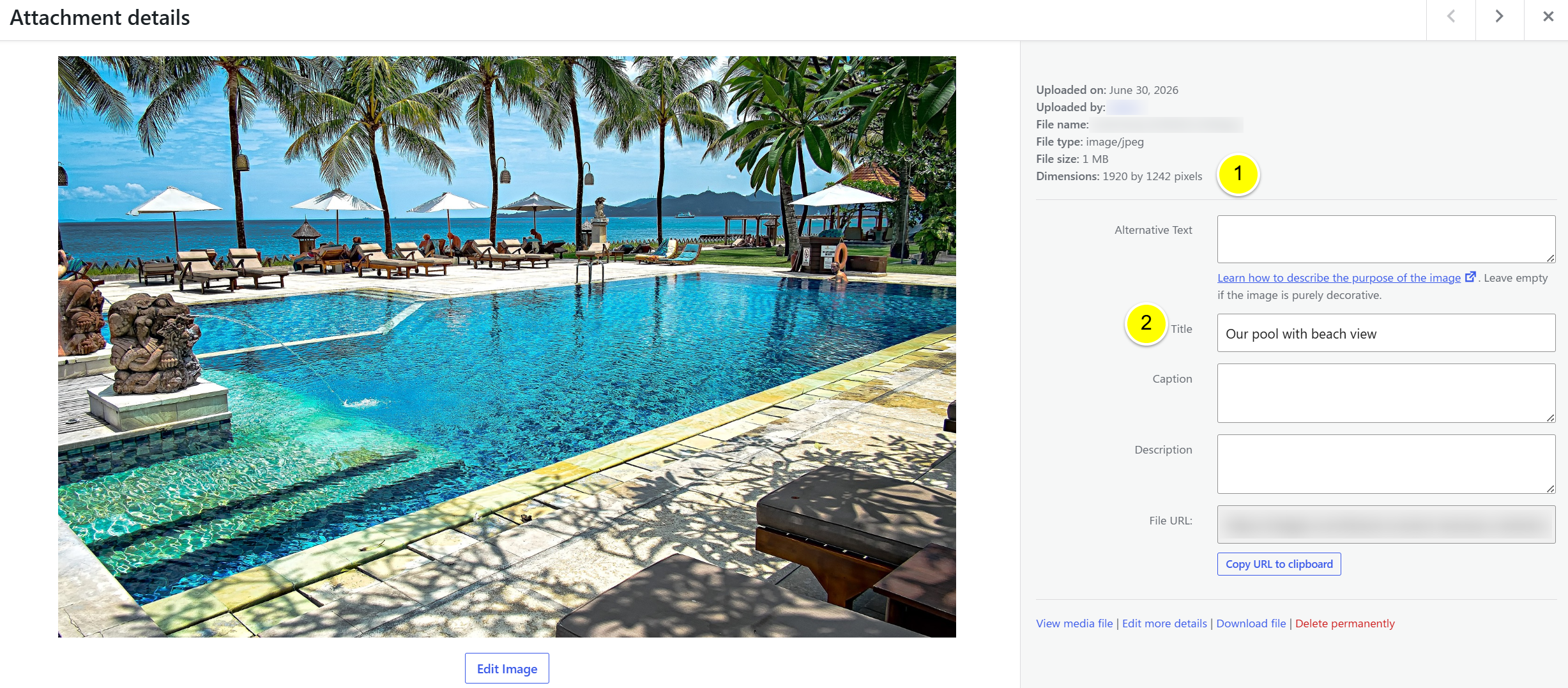
In your WordPress Media Library, click on an image you wish to use for Google Vacation Rentals/Hotels, and check the following:
-
Make sure the image size matches the requirements from Google Vacation Rentals or Google Hotels
-
Make sure to add a title that is relevant to the image.
The following information is shared with Google as image attributes: image width, height, title, date, and author.