
Automatic Invoice Generation
Invoices are automatically created as "proforma" documents:
-
when you receive a new reservation on your website
-
when you add a reservation from the admin panel.
You can include reservations imported from iCal in the automatic invoice generation process, but with the current version, a customer must have been created with at least an email address.
View this article for more details on “pro forma” invoices and final invoices.
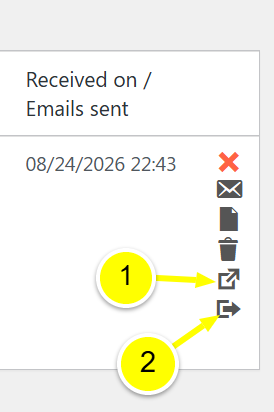
New actions in the Reservations list.
In the “Action” column, you’ll see two new actions.
-
Open the invoice in a new tab. This allows you to view the VosFactures invoice.
-
Convert the “Proforma” invoice into a final invoice. This action will convert your “Proforma” document into a final invoice.
We recommend that you perform this action only when the guest checks out. A final invoice can no longer be edited in HBook.
Automatic Updates to “Proforma” Invoices
HBook automatically sends the following changes:
-
making or receiving a payment
-
change in dates
-
changes to the number of people, accommodations, or additional services
-
invoice cancellation
-
invoice elimination
Known Limitations of Version 1.0
-
When a reservation is modified, a new “pro forma” invoice is created. In the future, we would like to be able to modify the initial “pro forma” invoice rather than recreate it. We are awaiting technical clarification from the VosFactures development team on this matter.
-
When a reservation is canceled or deleted in HBook, the “Proforma” document is properly canceled in VosFactures. We still recommend that you permanently delete the canceled document from the VosFactures interface. If you do not permanently delete it, a conflict may occur when creating other invoices. This issue is also currently being investigated with VosFactures.